About the Kedmanee Keyboard Layout
If you are an English speaker learning Thai, achieving fluency doesn’t stop at speaking and reading—it extends directly to your fingertips. To communicate naturally, write notes, or build software for macOS in Thailand, learning how to touch-type on the Kedmanee layout is an absolute necessity.
However, coming from a lifetime of typing English on standard ANSI or ISO QWERTY keyboards, there are unique historical constraints, structural logic, and platform anomalies (especially on macOS) that you must understand before diving into muscle-memory training.
What is the Kedmanee Layout?
Section titled “What is the Kedmanee Layout?”The Kedmanee layout (แป้นพิมพ์เกษมณี) is the undisputed de facto standard keyboard layout for the Thai language. Unlike English, which maps only 26 letters, the Thai script requires an expanded canvas to accommodate 44 consonants, 15+ vowel symbols, 4 tone marks, and various system diacritics.
Kedmanee handles this vast character set by mapping letters across nearly every single key on a standard keyboard frame, using the Shift key to access secondary layers of less frequent letters, numbers, and special symbols.
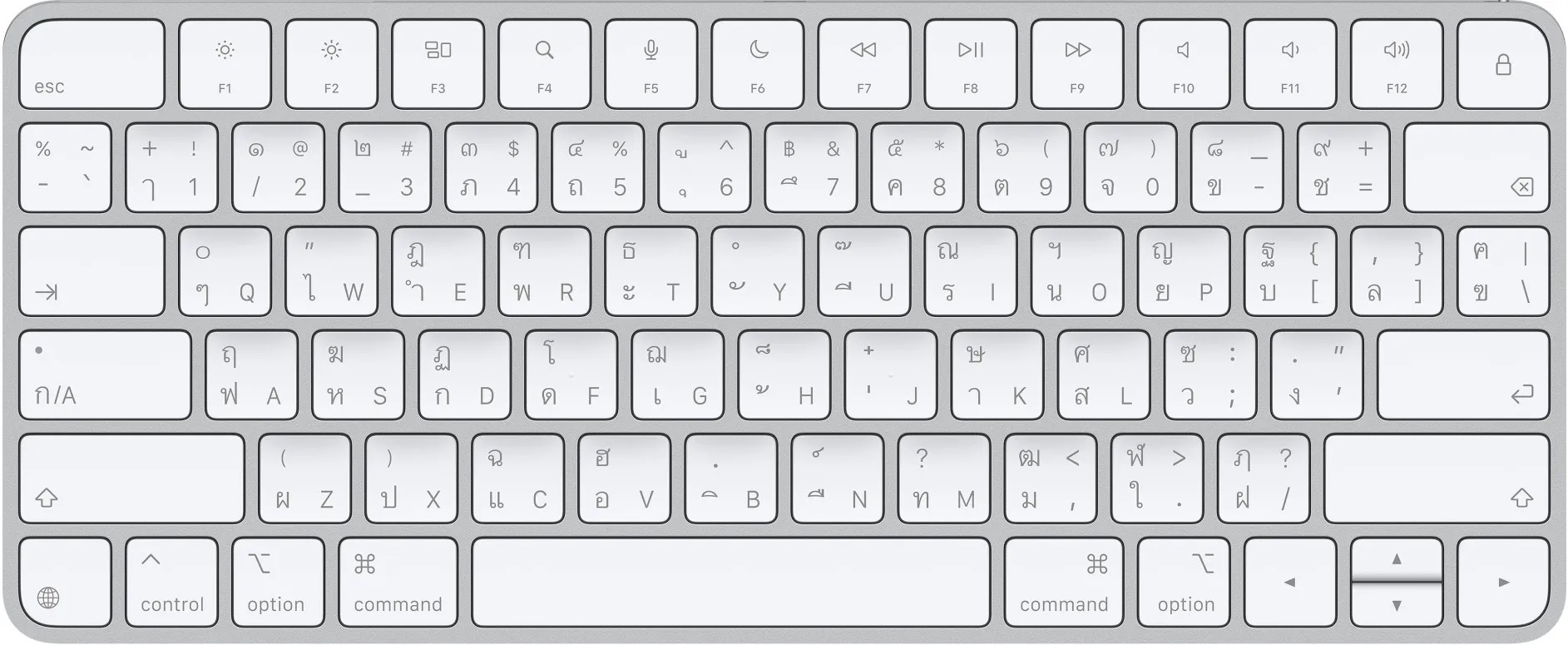
Why English Learners Must Learn Kedmanee
Section titled “Why English Learners Must Learn Kedmanee”As an English native, you might be tempted to look for a phonetic or “transliterated” Thai keyboard (where typing “K” gives you ก, or “M” gives you ม). While those exist as niche layouts, they will actively hinder your integration:
- Every physical keyboard sold in Thailand, every internet cafe, and every coworker’s computer is stamped with the Kedmanee layout.
- To look up terms in digital dictionaries smoothly or type with professional speed, training your fingers on Kedmanee is the only viable path to native-level typing fluency.
Historical Background & The Pattachote Rivalry
Section titled “Historical Background & The Pattachote Rivalry”The logic of where characters sit on your modern computer screen traces its lineage straight back to mechanical metal levers.
- The Typewriter Origins (1930s): In the early 20th century, typewriters were adapted for Thai script. In the 1930s, an engineer named Suwanprasert Ketmanee (working alongside typewriter importers) helped finalize a layout that placed high-frequency consonants and basic vowels on the home row to keep mechanical typewriters from jamming. This mechanical layout became wildly popular across Thai society.
- The Pattachote Challenger (1965): In 1965, an engineer named Sarit Pattachote analyzed the Kedmanee layout and realized it had a massive ergonomic flaw: nearly 70% of all keystrokes fell on the right hand, disproportionately straining the right pinky finger. He designed a scientifically optimized alternative—the Pattachote layout—which distributed the workload evenly between both hands and increased typing speeds by over 26%.
- Why Kedmanee Won: Despite the Thai government officially endorsing Pattachote and ordering state agencies to use it, the public heavily resisted. People were already too fast at typing on traditional keyboards, businesses refused to buy new hardware, and Pattachote failed to gain traction. Today, Kedmanee remains the undisputed king, while Pattachote exists merely as an optional software toggle for typing enthusiasts.
The TIS Standards: Codifying the Layout
Section titled “The TIS Standards: Codifying the Layout”When personal computers arrived in Thailand in the 1980s, the government needed to officially standardize the typewriter layout into digital software bits. This was handled by the Thai Industrial Standards Institute (TISI):
- TIS 820-2531 (1988): The first official digital standard. It took the typewriter framework and mapped it to standard computer layouts, shifting rare elements around to align with early software mechanics.
- TIS 820-2538 (1995): This is the modern, active version used by computer operating systems today. The 1995 update tweaked the positions of rare archaic characters—such as Anghankhu (๚) and Khomut (๛)—and established where the Thai Baht currency symbol (
฿) and native Thai numerals (๑, ๒, ๓) reside when holdingShifton the numeric row.
The Apple/macOS Implementation vs. Windows Standard
Section titled “The Apple/macOS Implementation vs. Windows Standard”As a macOS user, this is the most critical technical detail you need to know. Apple does not map its standard Thai Kedmanee layout exactly like a Windows PC or standard Linux desktop. When typing on an ANSI layout (the standard US rectangle return key layout) or an ISO layout (the European L-shaped return key layout), there is a classic conflict involving the Backslash (\\) / Pipe (|) key.